Laravel Folder Structure Explained
Introduction
Laravel is one of the most popular PHP frameworks used for building modern web applications. One of the reasons developers love Laravel is its clean and well-organized project structure.
When you create a new Laravel project, the framework automatically generates several folders and files. For beginners, this structure can look confusing at first.
Understanding the Laravel folder structure is important because it helps you know where to place your controllers, models, routes, views, and other application files.
If you have not installed Laravel yet, follow our guide first:
This article explains the main directories inside a Laravel project and what they are used for.
Creating a Laravel Project
You can create a new Laravel project using Composer.
Run the following command in your terminal:
composer create-project laravel/laravel myproject
After installation, the project directory will look something like this:
myproject
│
├── app
├── bootstrap
├── config
├── database
├── public
├── resources
├── routes
├── storage
├── tests
├── vendor
└── artisan
Each folder has a specific purpose in the Laravel ecosystem.
You can learn more about Laravel from the official documentation:
app Directory
The app directory contains the core logic of your application.
This is where most of your development work happens.
Important files inside this directory include:
app
│
├── Http
│   ├── Controllers
│   └── Middleware
├── Models
└── Providers
Common usage:
Controllers – handle application logic
Models – interact with the database
Middleware – filter HTTP requests
For example, controllers are usually created inside:
app/Http/Controllers
bootstrap Directory
The bootstrap folder is responsible for bootstrapping the Laravel framework.
It contains files that initialize the application and load configurations.
Important content inside this folder:
bootstrap
│
└── cache
The cache folder stores optimized framework files to improve performance.
In most cases, developers do not modify this directory directly.
config Directory
The config folder contains configuration files for different parts of the application.
Example files include:
config
│
├── app.php
├── database.php
├── cache.php
├── mail.php
└── session.php
These files allow you to configure application behavior such as:
Application name
Timezone
Database connection settings
Mail configuration
Environment-specific settings are stored in the .env file located in the root directory.
database Directory
The database directory stores files related to database structure.
It contains:
database
│
├── factories
├── migrations
└── seeders
Migrations allow you to define database tables using PHP code.
Example migration command:
php artisan make:migration create_users_table
If you are new to databases, you may also want to read:
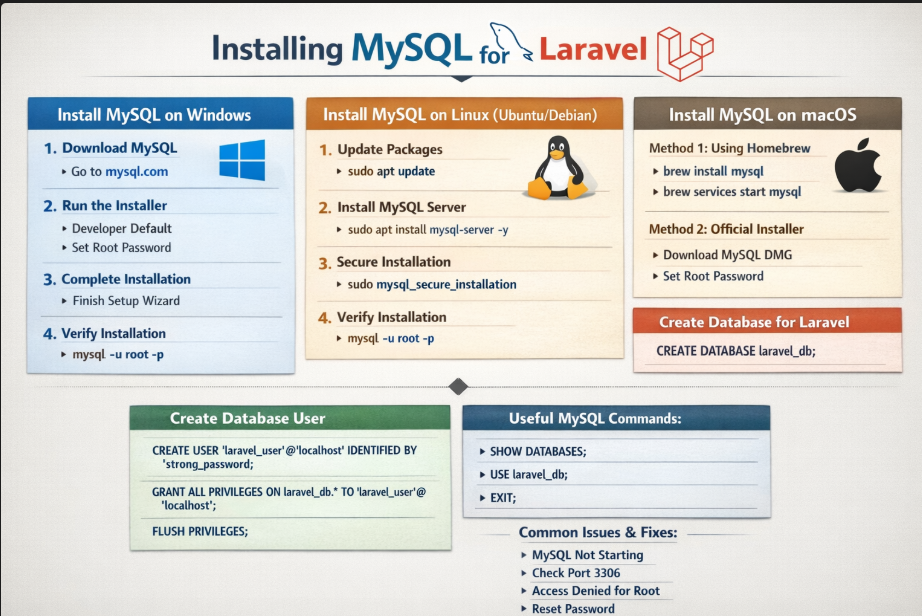
How to Install MySQL on Windows, Linux, and macOS
public Directory
The public directory is the entry point of a Laravel application.
It contains the index.php file that handles all incoming requests.
Typical structure:
public
│
├── index.php
├── css
├── js
└── images
All publicly accessible assets such as CSS, JavaScript, and images are stored here.
When a user visits your Laravel website, the request is handled by public/index.php.
resources Directory
The resources directory contains frontend files used by your application.
Typical structure:
resources
│
├── views
├── css
└── js
Important folders include:
views – Blade templates for displaying HTML
css – Stylesheets
js – JavaScript files
Laravel uses the Blade templating engine for creating dynamic HTML views.
Example Blade file:
resources/views/home.blade.php
routes Directory
The routes directory defines all application routes.
Typical structure:
routes
│
├── web.php
├── api.php
├── console.php
└── channels.php
The most commonly used file is:
routes/web.php
Example route:
Route::get('/', function () {
    return view('welcome');
});
Routes determine how URLs are handled in your application.
storage Directory
The storage directory stores generated files created by the application.
Example structure:
storage
│
├── app
├── framework
└── logs
Common uses:
Application logs
File uploads
Cache files
Session data
Laravel automatically manages most files inside this directory.
tests Directory
The tests directory contains automated tests for your application.
Typical structure:
tests
│
├── Feature
└── Unit
Feature tests simulate user interactions with the application.
Unit tests check individual components of the code.
Testing helps maintain code reliability as the application grows.
vendor Directory
The vendor directory contains all dependencies installed through Composer.
This includes:
Laravel framework files
Third-party libraries
PHP packages used by the application
Example:
vendor
│
├── laravel
├── symfony
└── composer
You should never modify files inside this directory manually.
Composer manages everything inside it.
If you want to learn how Composer works, read:
How to Install Composer on Windows, Linux, and macOS
artisan File
Laravel includes a powerful command-line tool called Artisan.
The artisan file located in the root directory provides access to many useful commands.
Example commands:
php artisan serve
php artisan make:controller
php artisan make:model
php artisan migrate
Artisan simplifies many development tasks such as creating controllers, models, and migrations.
Tags
Recent Posts

XAMPP Not Working? Fix Apache & MySQL Crashing Issues (Step-by-Step Guide)

How to Connect PHP with MySQL (Step-by-Step Guide for Beginners)
How to Run Your First PHP Project on Localhost (Step-by-Step Beginner Guide)

How to Install XAMPP on Windows and Run Your First PHP Project (2026 Beginner Guide)